How to Link Your NSS Unit to MY Bharat Portal 2026 Guide
If you are a National Service Scheme (NSS) volunteer, your hours and social service certificates will now be tracked exclusively through the Mera Yuva Bharat (MY Bharat) portal.
For 2026, the Ministry has made it mandatory to link your college NSS unit to your MBP ID to ensure your weightage marks and certificates are valid. Here is the exact way to do it.
Try to find my bharat portal registration guide , a Free step by step guide for you. Complete and Essential.
Why Link NSS with MY Bharat?
- Automatic Certification: Get your NSS “A”, “B”, or “C” certificates digitally.
- Hour Tracking: Every hour of social work is logged into your digital resume.
- National Events: Only linked volunteers can apply for the Pre-RD and Republic Day Camps via the portal.
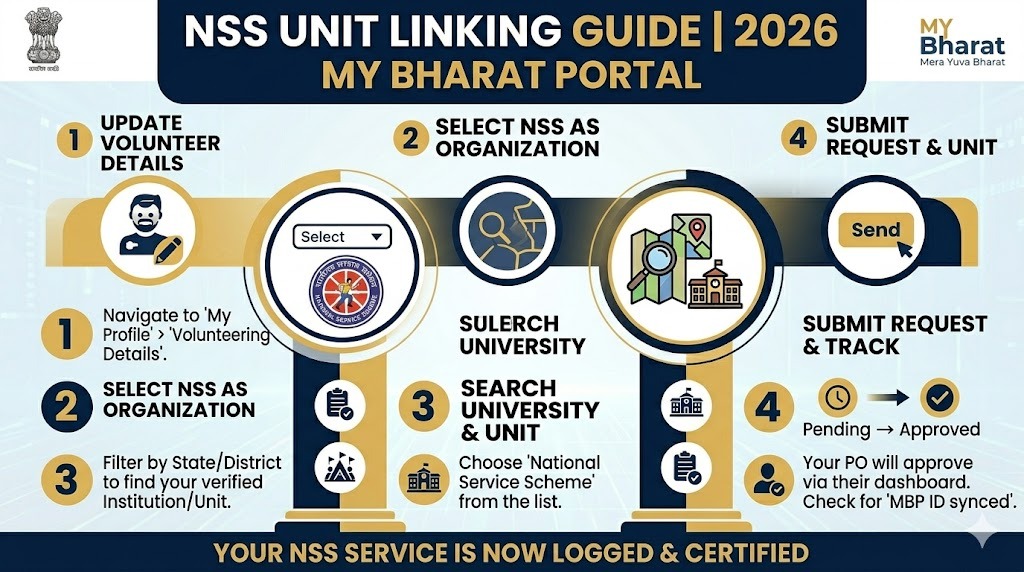
Step-by-Step: How to Link Your NSS Unit
1. Update Your Profile
Log in to your dashboard at http://mybharat.gov.in. Go to “Edit Profile” and scroll down to the “Volunteering Details” section.
2. Select “NSS” as Your Organization
From the dropdown menu, choose National Service Scheme (NSS).
3. Locate Your University and Unit
This is where most students fail. You must select:
- State: Your college’s state.
- District: The district where your University is headquartered.
- University/Directorate: Choose your University from the list.
- NSS Unit: Select your specific College Unit (e.g., Unit 01, Unit 02)
4. Wait for Approval
Once you click Submit, your request is sent to your college’s NSS Program Officer. They must log in to their administrative dashboard to “Approve” your request. Your status will show as “Pending” until they verify you.
Troubleshooting: NSS Unit Not Showing?
If you cannot find your university or college in the list, check these three points:
- Wrong District: Sometimes the University is registered in a different district than your college campus.
- Program Officer Inactivity: Your college may not have registered its “Unit” on the MY Bharat portal yet. Ask your NSS Program Officer to complete the “Institution Registration.”
- Spelling Variations: Search by the first few letters of your college name rather than the full title.
Pro-Tip for 2026 NSS Volunteers
Ensure your DigiLocker is linked before submitting your NSS details. If your Aadhaar name differs from your College ID, your hours may not sync correctly.
Malewai
rupalipokale3@gmail.com
Abhimanyu