The Ultimate Step-by-Step Guide for Youth & NSS Students
The Mera Yuva Bharat (MY Bharat) Portal has become the central nervous system for youth development in India. Whether you are an NSS volunteer looking to link your unit or a student seeking VBYLD 2026 opportunities, having a correctly verified profile is no longer optional—it’s essential.
In this guide, we break down the 2026 registration process, solve the common OTP errors, and show you exactly how to find your MBP ID.
What is the MY Bharat Portal? (2026 Update)
Launched by the Ministry of Youth Affairs and Sports, MY Bharat is a “phygital” platform designed to connect youth (aged 15-29) with experiential learning, volunteering, and government schemes. Unlike a standard job portal, MY Bharat focuses on leadership development and civic engagement.
Eligibility Criteria for Registration
Before you start, ensure you meet the following requirements:
- Age Limit: 15 to 29 years (standard youth category).
- Residential Status: Must be an Indian citizen.
- Documents Needed: Aadhaar Card (linked to mobile), working Email ID, and your Educational details.
How to Register on MY Bharat Portal: Step-by-Step (2026)
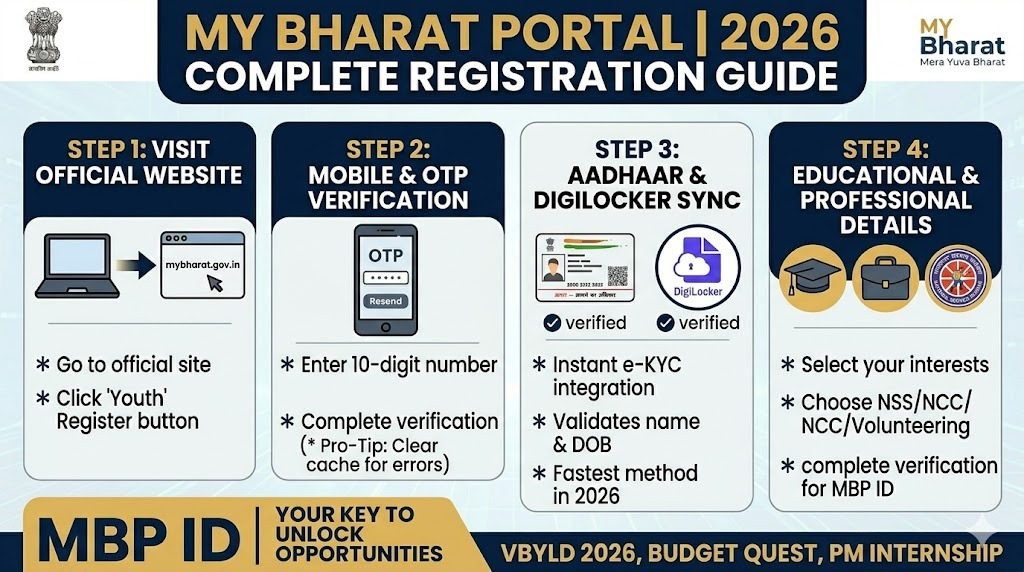
Step 1: Visit the Official Website
Navigate to mybharat.gov.in. Look for the “Register” button at the top right of the homepage. Select the “Youth” category to proceed.
Step 2: Mobile & OTP Verification
Enter your 10-digit mobile number.
Pro-Tip: If you are not receiving the OTP, clear your browser cache or try the registration during “off-peak” hours (early morning or late night) as the government servers often face heavy load during 10 AM – 5 PM.
Step 3: Aadhaar & DigiLocker Integration
For 2026, DigiLocker verification is the fastest way to get your profile verified. Link your Aadhaar card to instantly fetch your name and date of birth. This ensures your MBP ID is generated without errors.
Step 4: Fill in Professional & Educational Details
Select your interests (e.g., Volunteering, Skill Development, NSS, or NCC). If you are an NSS volunteer, ensure you select your specific University and Unit here to ensure your hours are tracked.
How to Find Your MY Bharat MBP ID
One of the most searched terms is “Where is my MBP ID?”.
- Log in to your dashboard.
- Click on “My Profile”.
- Your MBP ID (Mera Bharat Profile ID) will be visible directly under your name. You will need this number for all event participations like the Budget Quest 2026.
Common MY Bharat Problems & Fixes
- “Aadhaar Already Exists”: This means you created a profile earlier. Use the “Forgot Password” option with your Aadhaar-linked mobile number.
- NSS Unit Not Showing: If your college unit isn’t listed, your NSS Program Officer may not have registered the unit on the portal yet.
- DigiLocker Verification Failed: Ensure your name on Aadhaar matches your profile name exactly. Even a small spelling difference will trigger a fail.
Why You Need a MY Bharat Certificate in 2026
Participating in events like the VBYLD 2026 or National Youth Festival earns you digital certificates. These are now being recognized by various government departments and can be a massive boost to your resume for UPSC interviews and Government job applications.
Frequently Asked Questions (FAQ)
1. Is MY Bharat portal a job website?
No. It is a platform for experiential learning and volunteering. However, the skills and certificates earned here are highly valued by employers.
2. Can I register if I am over 29?
No, the portal is strictly for youth between 15 and 29 years of age.
3. How do I join the Budget Quest 2026?
Once registered, look for the “Events” tab on your dashboard. If you have a verified MBP ID, you can join the quest with one click.
2 thoughts on “MY Bharat Portal Registration 2026”